How to Turn Off Lane Assist in Toyota Camry 2025 (Disable It Now)
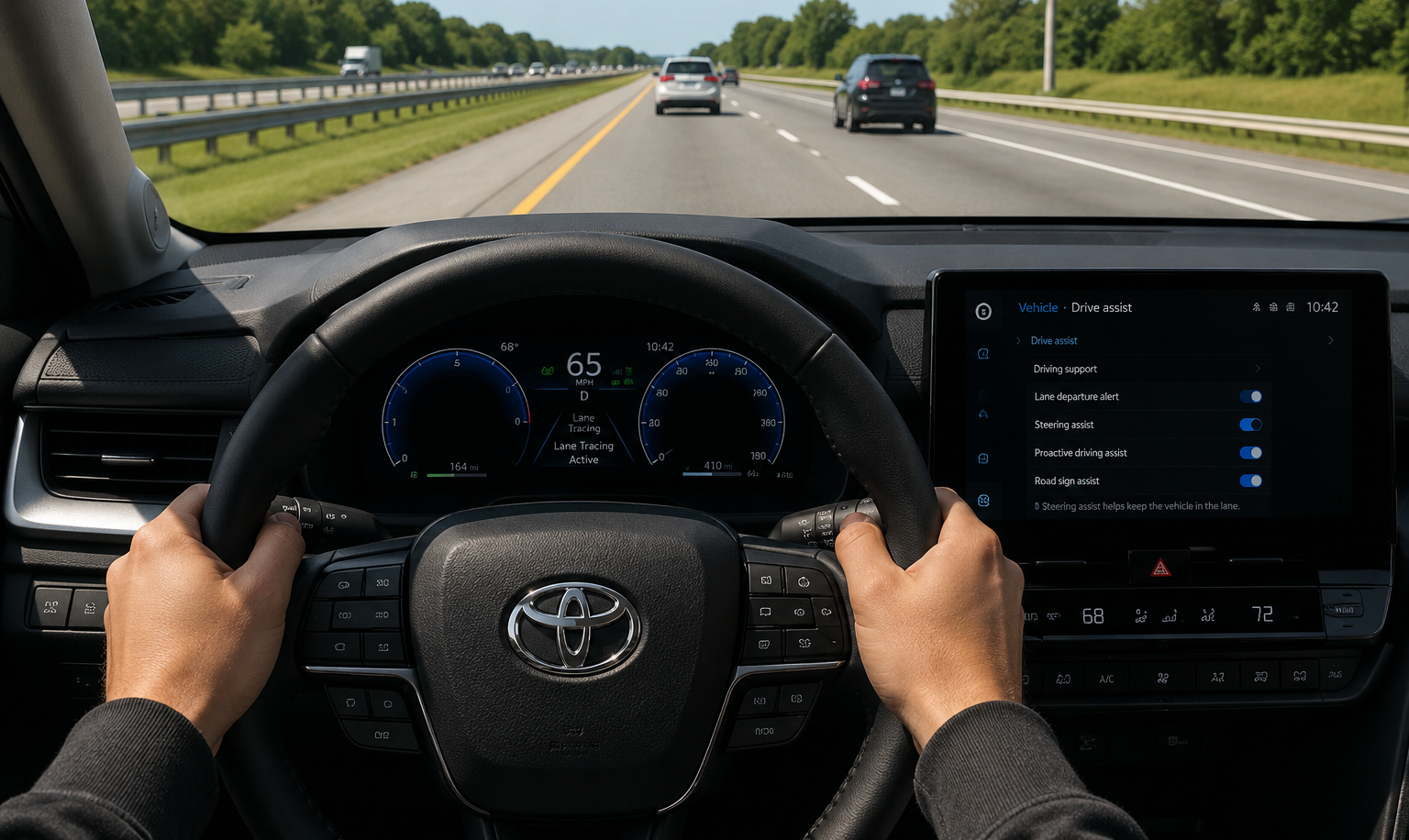
How to turn off lane assist in the Toyota Camry 2025? Press the Lane Assist button on the steering wheel or open the Safety Sense settings from the multimedia screen and disable Lane Tracing Assist. Most 2025 Toyota Camry models allow drivers to turn off steering assistance while keeping other safety features active.
The first time lane assist moves your steering wheel on the highway, it catches most drivers completely off guard. On the 2025 Camry, Toyota made this system noticeably smoother than older models, but that does not mean every driver wants it active all the time.
This guide explains how to turn off lane assist in the Toyota Camry 2025, where the settings are located, why the system turns back on, and how to fix common lane assist problems properly.
How Do You Turn Off Lane Assist on a 2025 Toyota Camry?
Turning off lane assist on a 2025 Toyota Camry usually takes less than one minute. Toyota placed the controls inside the steering wheel and multimedia settings so drivers can quickly adjust the system without dealership tools.
Some first-time Camry owners confuse Lane Departure Alert with Lane Tracing Assist because both systems work together through Toyota Safety Sense.
Where Is the Lane Assist Button Located?
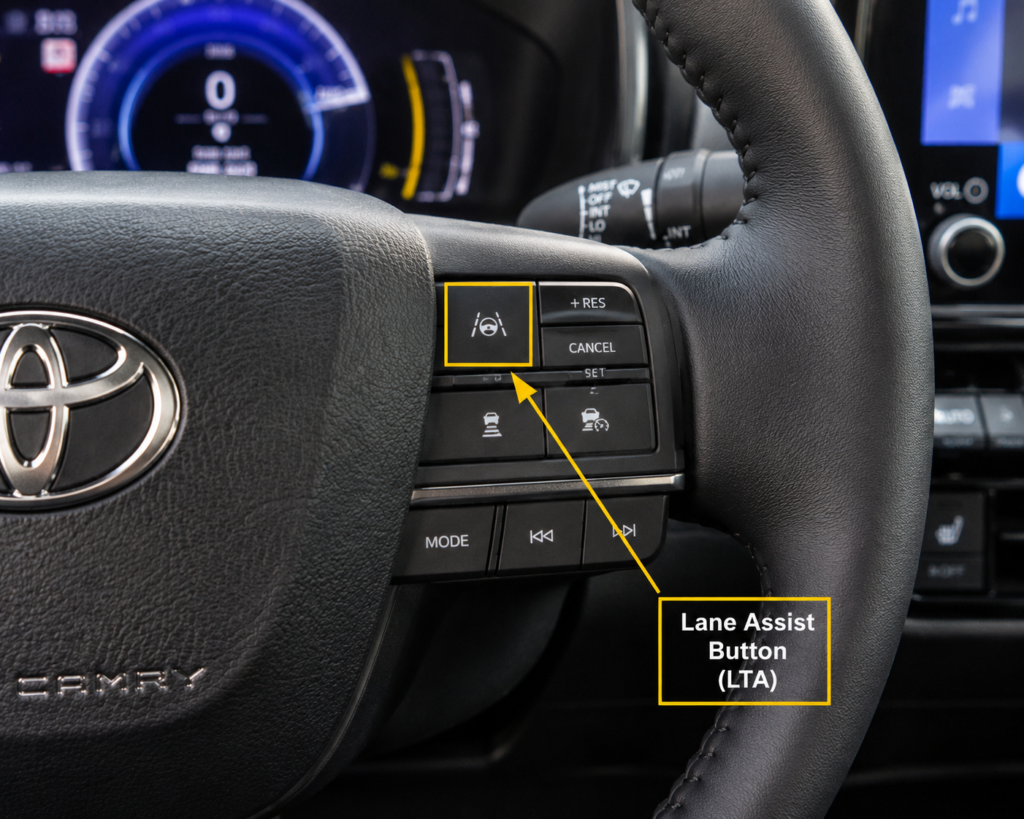
The lane assist button is usually located on the right side of the steering wheel, near the cruise control.
Most 2025 Camry trims show:
- A car icon between lane lines
- Steering wheel assistance symbol
- Safety Sense shortcut button
Some owners accidentally press Dynamic Cruise Control instead because the buttons sit close together.
How Do You Disable Lane Tracing Assist?
Open the vehicle settings menu, select Driver Assistance, then turn off Lane Tracing Assist and disable steering wheel vibration alerts separately if needed.
On some 2025 Camry trims:
- LTA and LDA appear separately
- Warning alerts can stay ON
- Steering correction can be disabled alone
Toyota changed the menu layout slightly compared to older Entune systems.
What Is Lane Assist in the Toyota Camry 2025?
Toyota Lane Assist uses cameras near the windshield to detect lane markings and help keep the car centered.
Older 2018 to 2021 Camrys sometimes gave sharper steering corrections, while 2025 models feel smoother during highway driving.
| Camry Years | Lane Assist Feel | Driver Feedback |
| 2018 to 2020 | More aggressive | Frequent steering input |
| 2021 to 2024 | Improved balance | Smoother correction |
| 2025 to 2026 | More natural | Less sudden movement |
According to Toyota’s official Safety Sense documentation, Lane Tracing Assist on the 2025 Camry uses a single front-facing camera combined with radar to detect lane markings at speeds above 50 mph. Below that threshold, the system reduces steering input automatically.
What Is the Difference Between LTA and LDA?
LDA warns the driver when the car drifts out of the lane. LTA actively adds small steering corrections to help keep the vehicle centered.
A lot of owners think both systems are identical, but LTA is the feature that actually moves the steering wheel slightly.
Why Does the Steering Wheel Move by Itself?
The steering wheel moves because Lane Tracing Assist gently adjusts steering when the camera detects lane drifting.
This usually happens:
- On highways
- During long curves
- When cruise control is active
Some drivers think something is wrong with the alignment the first time it happens.
Why Do Some Drivers Turn Lane Assist Off?
Some drivers disable lane assist because the system can feel too sensitive on narrow roads or in construction zones. In heavy traffic, repeated steering corrections and warning sounds may become distracting instead of helpful.
Drivers switching from older Camry models often notice the difference immediately because older Toyotas had fewer steering intervention features.
Drivers who frequently travel rural roads or construction-heavy highways report the most frustration with lane assist sensitivity. A 2025 Camry owner in a Toyota forum described the system triggering corrections every few seconds on a newly repaved state highway, not because of dangerous driving, but because the fresh paint confused the camera.
Does Lane Assist Feel Too Sensitive Sometimes?
Yes. Some 2025 Camry owners feel the steering correction reacts too early, especially on smaller roads with faded lane markings.
The sensitivity feels stronger:
- During highway driving
- Near road construction
- On narrow country roads
Toyota allows sensitivity adjustments on many trims through vehicle settings.
Why Does Lane Assist Beep on Narrow Roads?
The camera may incorrectly read narrow lane markings or road edges as lane departure risks.
This commonly happens:
- Near temporary construction lines
- On faded paint
- During heavy rain
- On uneven rural roads
Many drivers notice more warnings at night because lane visibility changes.
How Do You Turn Off Lane Assist From Settings?
Most 2025 Toyota Camry models allow drivers to control lane assist directly from the multimedia screen. Toyota grouped these settings under the Safety Sense and Driver Assistance menus.
The process feels easier than older Camry systems because newer screens respond faster and show visual lane assist graphics.
Which Menu Contains Lane Assist Settings?
Usually follow this path:
Vehicle Settings → Driver Assistance → Lane Assist or LTA
Some trims may label it:
- Lane Departure Alert
- Steering Assist
- Lane Tracing Assist
Toyota changed the menu wording slightly between LE, XLE, and XSE trims.
Can You Disable Only the Warning Alerts?
Yes. Many 2025 Camry trims allow drivers to keep steering assist active while turning warning sounds off.
Usually, adjustable settings include:
- Beep alerts
- Steering sensitivity
- Lane departure vibration
- Steering correction
Not every trim offers all adjustment options.
Does Turning Off Lane Assist Affect Safety?
Turning off lane assist only disables lane-related assistance features. Other Toyota Safety Sense systems usually continue working normally unless disabled separately.
Many drivers temporarily disable lane assist during snow, heavy rain, or road construction because lane markings become harder for cameras to read correctly.
Will Other Toyota Safety Features Still Work?
Yes. Features like:
- Automatic emergency braking
- Adaptive cruise control
- Blind spot monitoring
- Rear cross traffic alert
Usually, continue working after lane assist is turned off.
Does Turning Off Lane Assist Affect Cruise Control?
Dynamic Radar Cruise Control still works normally on most Camry models, even if lane assist is disabled.
However, lane centering support may stop working because LTA and adaptive cruise systems partially work together during highway driving. You may like to read our guide on Toyota Safety Sense features.
Why Does Lane Assist Turn Back On Again?
Some Toyota Camry systems automatically restore safety settings after restarting the vehicle. Toyota designed this behavior to keep driver assistance systems active by default.
This surprises many owners because they expect the vehicle to remember their previous settings permanently.
Why Does Lane Assist Restart After Ignition?
Toyota Safety Sense may automatically reactivate Lane Departure Alert after the engine restarts.
This behavior depends on:
- Trim level
- Driver profile settings
- Software version
- Safety defaults
Some newer trims save preferences more consistently than older systems.
What Problems Can Cause Lane Assist Issues?
Lane assist problems are often caused by blocked cameras, bad weather, dirty windshields, or incorrect wheel alignment, instead of actual hardware failure.
Technicians commonly inspect the front camera area first because even small dirt buildup can reduce lane detection accuracy.
Why Is the Lane Assist Light Flashing?
A flashing lane assist light usually means the system temporarily cannot read lane markings correctly.
Common reasons include:
- Dirty windshield
- Foggy weather
- Camera obstruction
- Bright sunlight glare
The warning often disappears once visibility improves.
Can Dirty Cameras Affect Lane Assist?
Yes. Dirt, bugs, or windshield film near the front camera can affect lane detection performance.
Many owners clean the windshield but forget the small camera area behind the rearview mirror.
How Does Lane Assist Work in Different Camry Trims?
Most 2025 Toyota Camry trims use Toyota Safety Sense 3.0, but feature adjustments and steering behavior may vary slightly depending on trim level.
Higher trims usually provide smoother lane centering and more customization settings compared to base models.
| Trim Level | Lane Assist Features | Extra Controls |
| LE | Basic LDA + LTA | Standard settings |
| SE | Improved steering assist | Sensitivity controls |
| XLE/XSE | Advanced driver assist feel | More customization |
Which Toyota Safety Sense Version Is Used?
The 2025 Toyota Camry uses Toyota Safety Sense 3.0 on most trims.
Compared to older systems:
- Faster lane recognition
- Smoother steering input
- Better highway tracking
- Improved camera processing
Toyota improved the system heavily after earlier driver complaints.
Did Toyota Change Lane Assist for 2025?
Yes. Toyota refined lane centering behavior and reduced sudden steering corrections on newer Camry models.
A lot of 2018 to 2020 owners complained that the wheel felt too aggressive, especially during highway curves.
Can You Turn Off Lane Assist While Driving?
Yes, but adjusting settings while driving can distract the driver. Toyota recommends changing safety settings while parked whenever possible.
Some steering wheel shortcuts allow temporary lane assist adjustments without fully opening the settings menu.
What Happens if You Disable It Mid-Drive?
The car usually shows a notification message confirming Lane Tracing Assist or Lane Departure Alert has been disabled.
Most drivers notice:
- Steering corrections stop
- Warning icons disappear
- Lane centering becomes inactive
Adaptive cruise control may still stay active.
How Do You Reset the Toyota Camry Lane Assist?
Resetting lane assist may help fix false warnings, frozen settings, or inconsistent steering corrections. Many small software glitches disappear after restarting the infotainment and Safety Sense systems.
Some owners think the camera failed when the system actually only needs TSS-3 recalibration after windshield replacement.
Can a System Reset Fix False Warnings?
Yes. A reset can sometimes clear:
- Random warning lights
- Incorrect lane alerts
- Steering glitches
- Camera communication errors
Minor software bugs are more common after updates.
When Should You Recalibrate the Camera?
Camera recalibration is usually needed after:
- Windshield replacement
- Front collision repair
- Suspension alignment changes
- Camera removal
Driving with an uncalibrated camera can reduce lane assist accuracy.
What Are Common Lane Assist Mistakes?
Many lane assist complaints actually come from a misunderstanding of how Toyota Safety Sense works. Drivers often expect the system to steer the car completely like self-driving technology, which it does not do.
Toyota designed lane assist to support the driver, not replace driver control.
Why Do Owners Disable the Wrong Setting?
Some drivers disable Lane Departure Alert but leave Lane Tracing Assist active, then wonder why the steering wheel still moves slightly.
Toyota menus can feel confusing because multiple lane-related systems appear separately inside the settings.
Can Tire Alignment Affect Lane Assist?
Yes. Poor wheel alignment can make the car drift slightly, which causes lane assist to correct the steering more often.
Technicians sometimes check alignment first when drivers complain about constant steering corrections on straight roads.
FAQs
Can you permanently turn off lane assist on a 2025 Toyota Camry?
Yes. Some 2025 Camry trims allow drivers to save lane assist preferences, but certain safety settings may reactivate after restarting the car.
Does turning off lane assist disable Toyota Safety Sense completely?
No. Features like automatic emergency braking and adaptive cruise control usually continue working even after lane assist is disabled.
Why does my Toyota Camry lane assist keep turning back on?
Toyota Safety Sense may automatically restore default safety settings after ignition restart or software updates on some trims.
Can dirty windshield cameras affect the Toyota Camry’s lane assist performance?
Yes. Dirt, fog, bugs, or windshield film near the front camera can reduce lane detection accuracy and trigger warning lights.
Does wheel alignment affect lane assist in a Toyota Camry?
Yes. Poor alignment can make the vehicle drift slightly, causing the lane assist system to correct steering more often than normal.
Conclusion
Lane assist on the 2025 Toyota Camry is designed to support driving, not override it. Knowing where the settings live, when the system reactivates, and what causes false warnings puts the driver back in control without turning off safety features that genuinely help on long highway trips.
Drivers who understand the difference between LDA and LTA stop fighting the system and start using it on their own terms. The 2025 Camry gives enough control through its settings menu that most drivers can find a balance between safety assistance and personal driving preference without disabling everything completely.