
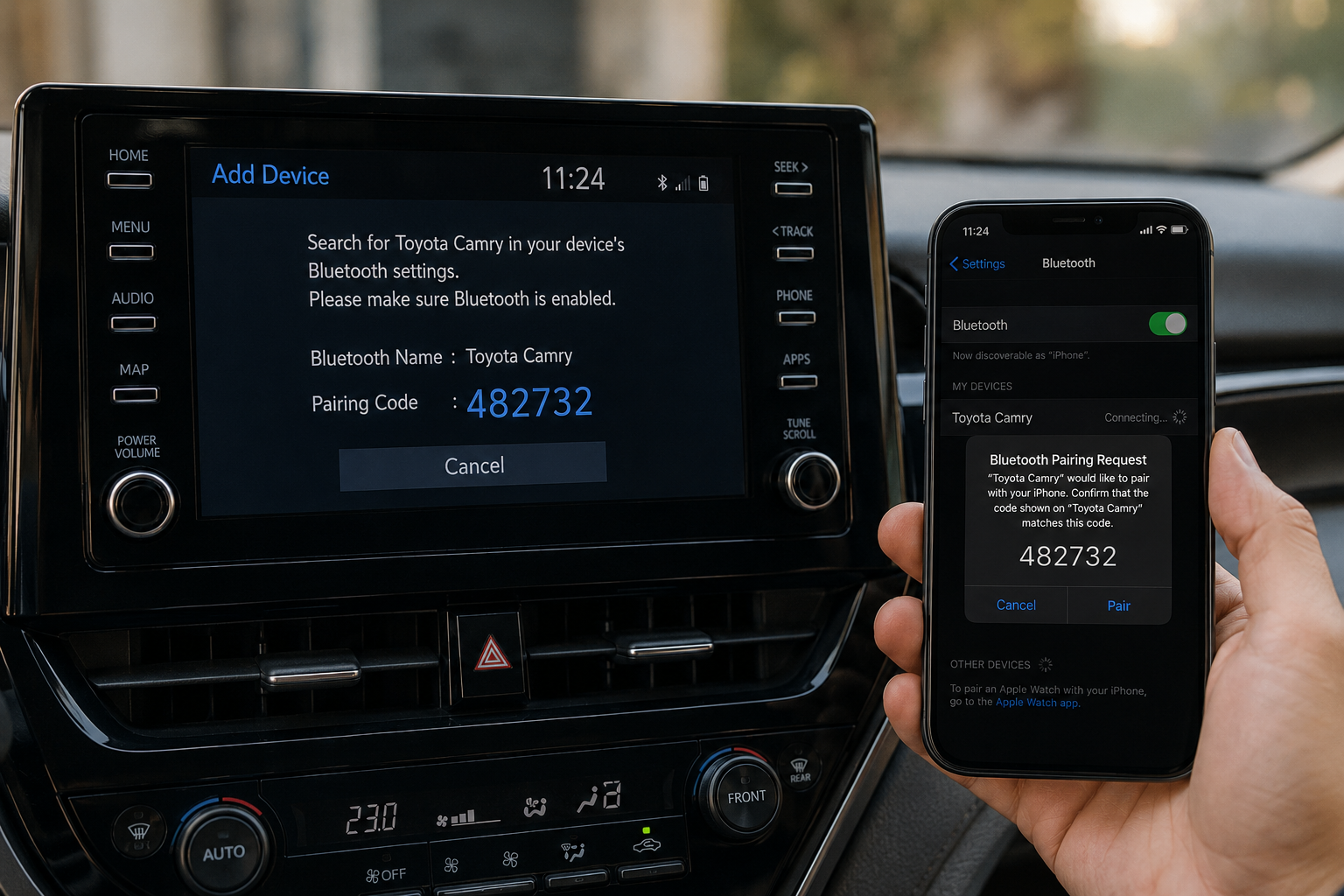
How to Connect Bluetooth to a Toyota Camry? (Start Pairing Now)
Connecting Bluetooth to a Toyota Camry usually takes only a few minutes. Most Camrys from 2007 to 2026 support hands-free calling and wireless audio, but the menu layout changes with the infotainment system.
Many first-time owners get confused, because older Camrys use physical buttons while newer models use touchscreen Toyota Multimedia systems.
This guide walks you through pairing step by step, explains common problems and why connections fail, and shows how to fix them without a trip to the dealer.
Steps to Pair a Phone With a Toyota Camry Bluetooth
Most Camrys follow a similar pairing process, even though the screen design has changed over the years.
Stay Safe: Pair Only When Parked
Never pair a phone while driving. Stop the car in a safe place first, then start pairing.
Typical steps include:
- Open Setup or Menu
- Select Bluetooth settings
- Tap Add Device
- Choose the Camry on your phone
- Confirm the pairing code
- Allow contact and media access
Some older Camrys from 2007 to 2011 may take longer to find newer smartphones during pairing.
Before Connecting Bluetooth in a Toyota Camry
Before pairing, make sure Bluetooth is on and old, unused devices are removed. Toyota systems allow several paired devices, but a full list can block a new connection.
If your Camry is used or newly bought, clear all previously paired devices before trying a new pairing.
Delete Old Paired Devices if Needed
Toyota systems usually store between 5 and 7 paired devices, depending on the year.
If pairing fails:
- Remove unused phones
- Restart your phone
- Turn the car off for one minute
- Try pairing again
How to Connect Bluetooth in Older Toyota Camry Models
Older Camry Bluetooth systems work differently from modern touchscreen systems. Many 2007 to 2011 models rely on steering wheel buttons and voice prompts instead of visual menus.
| Camry Years | Bluetooth Style | Common Limitation |
| 2007 to 2011 | Voice command system | Slower pairing |
| 2012 to 2017 | Entune touchscreen | Older software |
| 2018 to 2026 | Toyota Multimedia | Faster connectivity |
Bluetooth Setup in 2007 to 2011 Camry Models
Older Camrys usually need you to open Bluetooth setup through the steering wheel controls or the audio system menu.
Bluetooth Pairing in 2012 to 2017 Camry Models
Toyota Entune systems made pairing easier, with touchscreen controls and faster phone detection.
A few older Entune systems still struggle with newer Android updates, especially if the software has not been updated for years.
How to Connect Bluetooth in 2018 to 2026 Toyota Camry Models
Newer Camrys use larger multimedia screens with simpler Bluetooth menus. Pairing became much easier after Toyota introduced its updated multimedia platform.
Most newer Camrys make setup easier, because the pairing steps appear directly on screen instead of hidden inside menus.
Using the Toyota Multimedia Screen
Open the setup menu, tap Bluetooth, then choose Add Device. The system will search for nearby phones and show them on screen.
Pairing the iPhone with the Toyota Camry
Most iPhones connect quickly to Toyota systems, because Apple devices give a stable Bluetooth connection.
Most owners only need:
- Enable Bluetooth on iPhone
- Select the Camry device
- Confirm pairing code
- Allow contact syncing
Some people accidentally block contact permission during setup, and later lose the caller name display on screen.
Pairing Android Phones With the Toyota Camry
Android pairing works in a similar way, but connection stability can vary more between phone brands. Samsung and Pixel devices usually connect smoothly, while some budget Android phones may need a software update first.
Toyota Camry Bluetooth Pairing Step-by-Step
Toyota kept the pairing process fairly similar across most Camry generations. Once you have done it once, doing it again is easy.
Open the Setup or Menu Screen
Press the Setup or Menu button on the infotainment screen first. On older Camrys, Bluetooth options may sit inside the audio or phone menu instead.
Select Bluetooth and Add Device
After opening Bluetooth settings, choose Add Device to make the car discoverable. Some Toyota systems enter pairing mode on their own, while others need confirmation.
Confirm the Pairing Code
The pairing code must match on both the phone and the car screen before the connection finishes. Many failed pairings happen because people confirm different codes too quickly.
Why the Toyota Camry Bluetooth Is Not Connecting
Bluetooth problems are common in older Camrys and on phones with outdated software. In many cases, the cause is device limits or permissions, rather than a broken Bluetooth module.
Older Toyota systems may lose Bluetooth stability after major iOS or Android updates, so it is worth checking software compatibility.
Pairing Failed or Connection Rejected
Failed pairing usually happens because:
- Too many saved devices exist
- Bluetooth permissions are blocked
- Phone software is outdated
- The infotainment system froze for a while
In many cases, restarting both the car and the phone solves the problem.
Phone Connects, but Audio Does Not Work
Sometimes calls work normally, while music refuses to play through the speakers.
This usually happens when:
- Media audio permission is disabled
- The wrong audio source is selected
- The phone connects only for calls
Older systems from 2012 to 2014 commonly show this issue after phone software updates. Some drivers think the speakers are broken, but the Bluetooth media permission is usually the real problem.
Bluetooth Keeps Disconnecting While Driving
Random disconnects often happen because of battery optimisation settings inside smartphones.
Some Android devices turn off Bluetooth activity in the background to save battery, which makes the car lose connection while driving.
Read Guide: How to Fix Tacoma Wireless Charger Not Working?
How to Reset the Toyota Camry Bluetooth System
Resetting Bluetooth usually fixes freezing, failed pairing or missing audio problems. Most Toyota systems allow a soft reset without deleting saved radio presets.
To fully reset Bluetooth on a 2018 to 2026 Camry, go to Setup, then General, then Delete Personal Data, and confirm the reset. This removes all paired devices and stored Bluetooth profiles.
Restart Toyota Multimedia System
Restarting the infotainment system can clear frozen Bluetooth connections.
It usually helps with:
- Audio lag
- Device detection issues
- Random disconnects
- Frozen pairing screens
Some newer Camrys reboot the multimedia system on their own after software updates.
Toyota Camry Bluetooth Features Explained
Toyota Bluetooth systems now do more than just phone calls. Newer Camrys include media streaming, contact syncing, voice control and smartphone integration through Bluetooth.
Which features you get still depends a lot on the model year and trim level.
| Feature | Older Camry | 2018 to 2026 Camry |
| Hands-free calls | Yes | Yes |
| Wireless music | Limited | Full support |
| Contact sync | Basic | Improved |
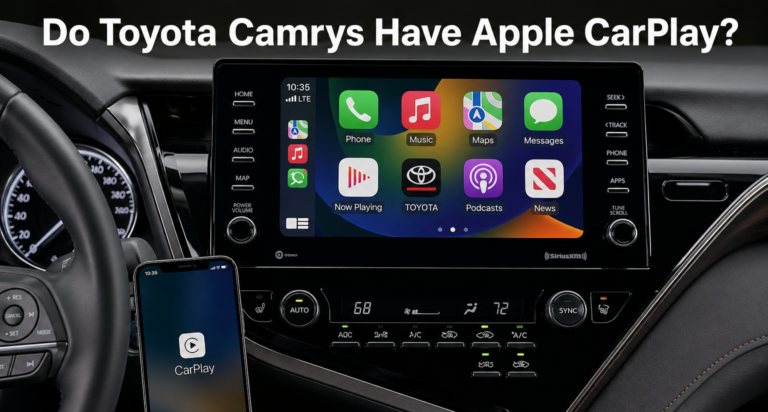
| Apple CarPlay | No | Yes |
| Android Auto | No | Yes |
Also Read: Do Toyota Camrys Have Apple CarPlay?
Apple CarPlay and Android Auto Support
Most Camrys from 2020 to 2026 support Apple CarPlay and Android Auto, either wired or wirelessly depending on the trim.
Common Bluetooth Mistakes Toyota Camry Owners Make
Most Bluetooth problems happen because of setup mistakes, not hardware failure. Small menu differences between Camry generations cause most of the confusion.
Pairing the Wrong Toyota System
In car parks, several Toyota Bluetooth systems may appear on your phone screen at the same time. Owners sometimes connect to another nearby Toyota instead of their own Camry.
FAQs
Can a Toyota Camry connect to two phones at the same time?
Yes. Many newer Camrys allow two phones to be paired for calls and media.
Does the Toyota Camry Bluetooth support Spotify music streaming?
Yes. Most Camrys from 2012 to 2026 can stream Spotify and other music apps through Bluetooth audio.
Why does my Toyota Camry Bluetooth keep disconnecting after pairing?
This usually happens because of outdated phone software, saved device conflicts or battery optimisation settings.
How do I reconnect Bluetooth after resetting my Toyota Camry system?
Delete the old paired profile from both the phone and the car, then pair again from the beginning.
Is Bluetooth available in every Toyota Camry model?
No. Some lower-trim Camrys from before 2007 did not include factory Bluetooth support.
How to Restart the Car’s Multimedia Screen
Press and hold the power or volume knob for about 10 seconds until the screen goes black and restarts. This works on most models. Then try pairing again.
If Pairing Still Fails After a Reset
Delete the car from the phone’s Bluetooth list, and delete the phone from the car’s list. Restart the phone. Update the phone software. Then try a different phone, to learn if the fault is the phone or the car.
When to See a Dealer or Specialist
See a dealer or specialist if the screen freezes often or restarts by itself, if Bluetooth drops every few minutes with every phone, or if buttons on the screen or steering wheel do not respond. These can be hardware faults.
How to Keep Bluetooth Working Well
Keep the phone software updated. Remove old unused devices from the car’s list. Restart your phone now and then if connections get slow.
Conclusion
Learning how to connect Bluetooth to a Camry becomes much easier once you know which menu your model uses.
For more help with your Camry, read Toyota Camry CarPlay Not Working (Fix It Now) and Do Toyota Camrys Have Apple CarPlay?. You can also check the official Toyota Camry page for the latest model details and Apple Support for iPhone help.

6 Comments